
Music Visualization
The program uses internationally patent-protected technology for controlling lighting equipment directly from the music signal (LTCA). It can thus ingeniously control all of your lighting equipment directly with music. The most widespread and commonly used protocol, DMX512, is employed to control the lighting equipment.
In version 4.0 for 2026, we are introducing groundbreaking new features! Go to the DOWNLOAD section.

= = = = = = = = = = = = = = = = CREATE A SHOW IN A FEW CLICKS = = = = = = = = = = = = = = = = = = = = = =
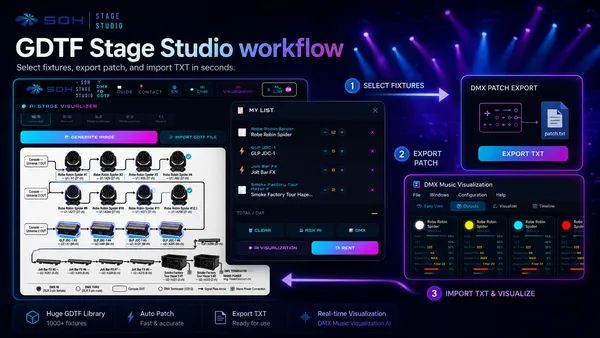
1. GDTF Stage Studio: Select your lights and add them to "My List". In the light's detail you can choose the DMX mode. The quantity of each light model can be set in "My List".
2. Export: In the „My List“ section, click the Export TXT button under DMX. This downloads a file with the patch (addresses) of your lights.
3. Import: Open the program and simply drag the downloaded TXT file into it with your mouse.
4. Generating the show: From the menu, choose File -> Design New Project and then File -> Generate Scenes with AI.
The AI automatically creates scenes, movements, and color changes for your entire rig.
1. GDTF Stage Studio: Select your lights and add them to "My List". In the light's detail you can choose the DMX mode. The quantity of each light model can be set in "My List".
2. Export: In the „My List“ section, click the Export TXT button under DMX. This downloads a file with the patch (addresses) of your lights.
3. Import: Open the program and simply drag the downloaded TXT file into it with your mouse.
4. Generating the show: From the menu, choose File -> Design New Project and then File -> Generate Scenes with AI.
The AI automatically creates scenes, movements, and color changes for your entire rig.
= = = = = = = = = = = = = = = = = = = = = = = = = = = = = = = = = = = = = = = = = = = = = = = = = = = = = = = = = =
Scenes and chases can now be created and edited easily using the integrated AI chat powered by the latest Google Gemini model (you can also use any other AI via the API). To import lights, simply take a photo of the manual and the program analyzes the DMX channels itself and adds the lights to the project. For fixtures you can use the extensive Avolites database (.d4), the GDTF standard, Daslight (.d4), or even just a scanned manual in PDF or JPEG. At the same time, the program can also be used for automated generation of standard fixtures to GDTF and Avolites for your own use, and this is not restricted in any way, even in the free version.
You can share your project with our database on Stage Studio or GDTF Studio and have Google Gemini create a visualization of your built stage with a single click, a promotional flyer, or a scene diagram. We are currently developing new music triggers and real-time AI analysis of the music scene. For FFT analysis, the program now offers a WASAPI option in addition to MMSystem.
For full operation, all you need is a standard PC with a sound card and USB. Music analysis runs in the background from any input (line-in, microphone) or PC output. The program is primarily designed for clubs, discotheques, and live music. No intervention is needed throughout the entire music performance. The program automatically recognizes different passages and musical styles. Simply set up and configure the connected lighting equipment properly, and the story contained in the music will be projected into visual impressions as well. However, you can also intervene in the control, or operate the entire scene manually using, for example, DJ buttons or a wireless controller.
Advantages the system developed to control lighting technology:
- The application is able to control lighting technology by music in real time.
- Human intervention is not necessary.
- It allows better utilization of lighting technology.
- It can run nonstop.
- In contrast to a lighting technician, it can control every one of tens of lighting units (or effects) individually.
- Harmonizes lighting scene even with a new unknown music performance.
- It can quickly react to unpredictable changes in the music.
- The aplication works on any ordinary PC.
- It can control lighting technology already built in.
- Music source can be any input or output of a sound card.
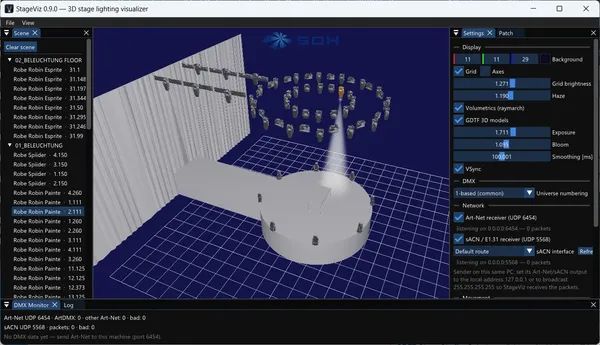
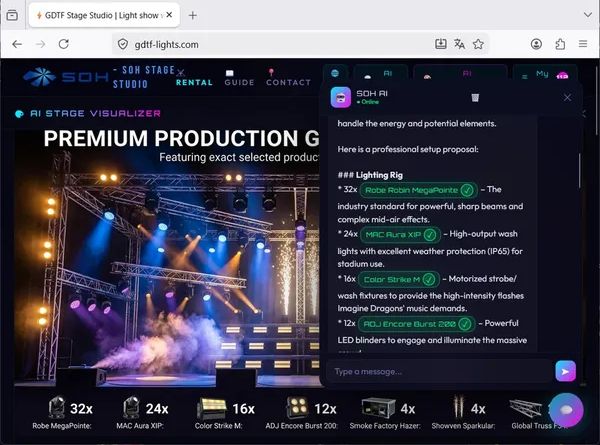


Preview of the Music Visualization 1.4 software.


Window for graphical generation of a chase and configurable DJ buttons.

Connection of various peripherals with the Music Visualization software
Minimal hardware requirements
- 1 GHz CPU or higher
- Windows 7 or higher (Windows 10 or 11 recommended)
- USB port 1.1 or 2.0
- Download via the internet (USB optional)
Supported DMX512 Interfaces:
- Art-Net
- DMX PIPE
- SOH USB-DMX512 Module
- ENTTEC Open DMX USB
- Enttec DMX USB Pro
- Eurolite USB-DMX512
- JMS USB2DMX OPTO
- JMS USB2DMX PRO
- nvent Open CoreDMX USB
- OpenDMX Interface / OpenDMX.de
- Yarilo Mini Open DMX
- Yarilo Open DMX
- And FTDI FT232RL and FT232BM compatible interfaces
Manuals
How to create your first project
Video clips of the software in use
Download Music Visualization Demo Software
CD Contents
- DMX Music Visualization
- DMX512 Light Control Full Version (for Windows XP, Vista, 7, 10, 11, CE, Pocket PC, SmartPhone)
- DMX512 PC Control Free Version
- DMX PIPE Drivers

Software License
| License | Description | Price |
|---|---|---|
| Free | 24 DMX channels, max. 8 attributes, - not for commercial use | FREE |
| 16/30 Lite | 30 DMX channels, max. 10 attributes, includes DMX PIPE | $125 |
| 48 Basic | 48 DMX channels, max. 20 attributes, includes DMX PIPE | $303 |
| 256 Standard | 256 DMX channels, unlimited attributes, includes DMX PIPE | $720 |
| 512 Art-Net | 512 DMX channels, Art-Net, unlimited attributes, includes DMX PIPE | $1170 |
| 1024 Art-Net | 1024 DMX channels, Art-Net, unlimited attributes, includes 2x DMX PIPE | $1577 |
| 3072 Art-Net | 3072 DMX channels, Art-Net, unlimited attributes, includes Art-Net Node Universe | $2580 |
Software Upgrade
| from => to | 16/30 Lite | 48 Basic | 256 Standard | 512 Art-Net |
|---|---|---|---|---|
| DMX PIPE (Free) | $ 50 | $ 229 | $ 645 | $ 1095 |
| 16/30 Lite | --- | $ 197 | $ 615 |
$ 1065 |
| 48 Basic (& Average) | --- | --- | $ 437 |
$ 887 |
| 256 Standard (& Full) | --- | --- | --- | $ 470 |


